Narrow down search results by common characteristics.
There are many tasks in our applications that begin with a search. For this reason, it is important to understand and follow some basic filtering guidelines and best practices in order to optimize the searching experience.
- Distinguish between filtering, searching and sorting.
- Filtering should be used when presenting the unfiltered dataset in some way is useful. That is, show a default view, and then reduce down from there. (e.g. email, latest is probably useful, filtering from there is useful).
- Searching should be used when there is no default view which makes sense. Start with an empty view, and fill with items that are found. Best when you can't make sensible assumptions about what data might be of interest to your user up front (e.g. search engine)
- Identify commonly used search parameters and offer them first.
- Implement autocomplete whenever possible for a filterless search experience.
- Use simple, common language for filter labels.
- Present category-specific filters.
- Allow multiple filter selection.
- Always display applied filters.
- Implement funneling filters to narrow down the search options.
- Filter changes should trigger a new browser view so users can go back to previously applied filters using the browser's "Back" button.
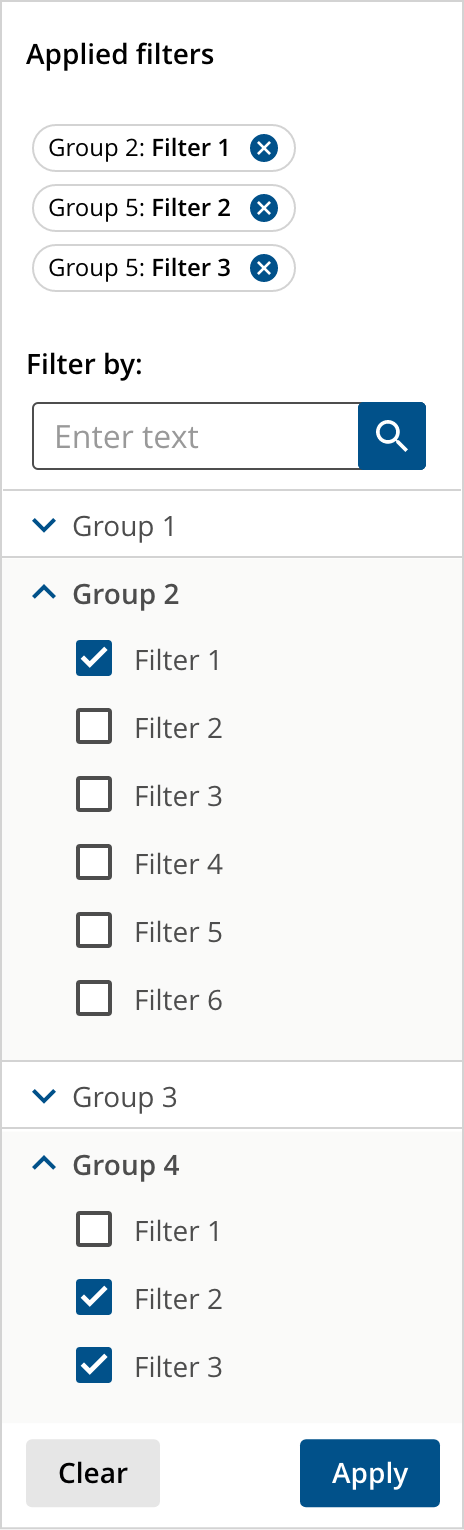

Filtering and sorting are powerful tools that make searching for what users need to find quicker and easier.
Take your time, understand your use case and get to know the organization and structure of the data to be searched in order to determine the best filtering pattern for it.
We would like to get your feedback. Tell us how you use this component in your projects and how we can improve it.