UL is a global company, with clients around the world. As such, it is recommended that applications embrace its diversity and adapt graciously to their different norms.
A UL product should render content in the correct language. To determine which one it is:
- Use whichever language the user has determined in his/her application preferences.
- If there is no preference set, use the agent's (i.e. browser/screen reader) language.
- HTTP requests typically send a
Accept-Languageheader, which is met with the appropriateContent-Languageresponse header. - JavaScript applications have the ability to identify the browser's active language which can be leveraged to dynamically change translations.
- HTTP requests typically send a
- If that language is not available, inform the user upfront and provide a way of choosing an alternative if he/she doesn't want the default English version.
Note: do not rely on geolocation / region to determine which language to use as both aren't necessarily interchangeable.
We recommend trusting the user over any agent. At any point in time, the user may choose a different language in which an application is localized to. The switching mechanism lives in both the header and footer of the application, making it obviously clear. It must not depend on imagery/iconography (i.e., flags) but rather it must use text with the name of the language, translated to that language so that native speakers can understand.
Despite the user being able to switch languages, this does not mean, however, that regional information is rendered differently, as it does not depend on language. For example, if a user lives in France but would still rather see the application rendered in English (US), a form that requires his/her address would ask for a postal code instead of a zipcode. Also, if it requires a phone number, it would provide a format that matched France's norms.
Not all languages are geometrically the same in a screen. For example, a word in English is typically smaller to its German translation counterpart (e.g. "approval" → "genehmigung"). Furthermore, if the target language is oriented right-to-left (RTL), it is even less predictable.
Consider the following guidelines:
- Avoid small containers for some components. Good examples of these are compact vertical navigation bars and narrow sidebars. Instead, prefer larger variants which accommodate larger translations more naturally.
- Avoid placing components and content in tight spaces. A good example of this is when placing a series of buttons in a line on a mobile screen, where you'd rather stack them.
- Don’t create sentences with UI elements. Doing so is prone to cause accessibility issues, and it is not as responsive — it becomes increasingly difficult to adjust for other viewports and writing systems.
- Use descriptive feature names that are easily translatable, as it promotes readability and reduces cognitive load from users.
English is one of the many languages that use the Latin alphabetic writing system. However, there are other systems:
- Alphabetic: Greek, Cyrillic, Armenian, …
- Logographic / syllabic: Hanzi (China), Kana (Japan), Kanji (Japan), Hangeul (Korea), …
- Abjad: Arabic, Hebrew, …
- Abugida: Hindi, …
It is recommended to use "Open Sans" as the default font. However, if you intend to support non-Latin writing systems, use a variant of Noto Sans instead.
If your audience includes a demographic that speaks an RTL language, your application should behave appropriately. More specifically, layout and content should mirror.
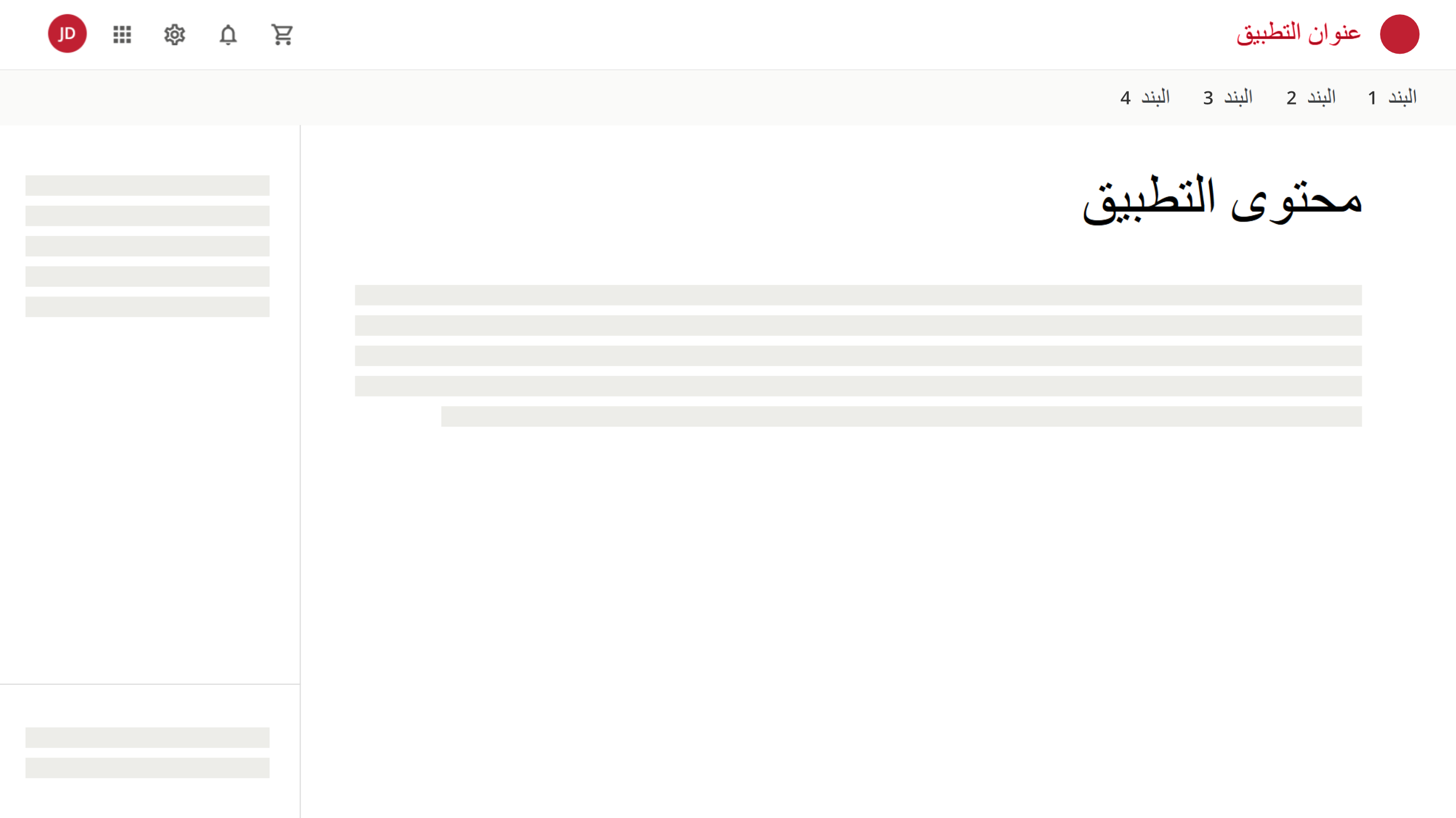 An application displayed in Arabic. Rendered from right to left, completely mirrored.
There is the exception of Chinese, Japanese and Korean (CJK) dialects where, despite traditional mediums being scripted top-to-bottom/right-to-left, content on the web is displayed left-to-right/top-to-bottom (influenced by Western scripts).
See RTL Styling 101 for more specific details around implementation on the web through CSS.
Localization is the process of adapting an experience to the user's regional settings. For example, most countries use postal codes, while the United States have zipcodes. Phone numbers have different formats and dates are rendered differently.
Depending on the user's context, localization might change. A form that collects regional information (e.g. addresses, phone numbers, postal codes, …) should render the appropriate controls.
Dates should be displayed according to the user's regional settings. Each language has its own way. Specifically for the web, JavaScript has Date#toLocaleDateString to properly localize dates.
If your application is used for multi-geographical customers, ensure that all time records are timezone sensitive. For example:
- A user based in Chicago executes an action at 9:00 AM.
- Another user based in New York should see a record of that action being executed at 10:00 AM.
- Yet another user based in London should see the same record with a timestamp of 3:00 PM.
- Images are supportive material to text. Do not embed text in images.
- Prefer to ask for a user's name in a single input rather than two or three. Form fields for first name and last name is anglo-centric. Many cultures list names with family name first then given name. Three or more names is common in many cultures.
Here are some recommended guidelines for implementing your applications:
- Default to UTF-8 as your application's charset.
- If you're serving content through HTTP, provide a Content-Language](https://developer.mozilla.org/en-US/docs/Web/HTTP/Headers/Content-Language)) header.
- Indicate the language of the screen being served through
- If any fragment of HTML is in a different language than the whole page, use the
langattribute to identify it as such. This is particularly useful for user-generated content.