System and action messages for the user
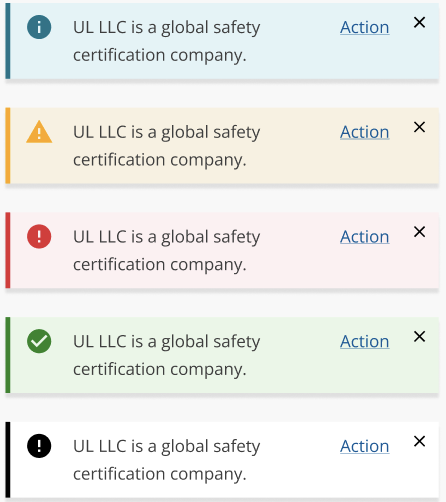
Providing clear communication and feedback to users is crucial for building confidence and trust.
Limit Notifications, use sparingly, and ensure purpose is clear.
See "When to Use" / "When Not to Use" to differentiate between the different alert types.
- System status, validation messages, event notifications.
- Meta information about the user's current task, which is specific to them.
- Medium priority, critical task-level alerts.
- Use sparingly, otherwise they lose their impact. Should be informing the user of an exceptional case, or as part of a rarely used flow.
- Avoid using alerts for non-critical information that can be conveyed through other UI elements.
- Don't only rely on this for critical instructions to the user. There should also be some other mechanism to reduce errors.
- For persistent issues consider using a banner instead.
- Inline validation alerts on forms.
- Elements (Illustration needed)
- Accent: Notification color.
- Icon: Notification icon.
- Label: Descriptive text or title.
- Action: Optional user action.
- Dismiss: Dismiss button.
- Must be inline* (provide visual example)
- Banners do not clear themselves. They may optionally have a close button, unlike toasts, which do clear themselves.
- Writing & Tone: Limit to 200 characters; use noun + verb pattern; address users directly with "we," "our," and "you".
- Alert types:
- Info - give info about possible alternative options, meta data about a choice
- Warning - warn about a potential error
- Danger - warn about potential loss of service, loss of data
- Success - confirmation of successful completion of a task
- Trigger & Dismissal:
- Persistent until user closes or navigates away
- The user can only close if the alert is dismissible.
- Should disappear if the conditions that caused the alert to be displayed are no longer in force.
- When triggered this will result in an inline error*
- An inline alert as a result of a user task completion flow
- Persistent until user closes or navigates away
- Contextual to content/action.
- Clicking on the close button dismisses the alert.
- WAI-ARIA:
- Use
role='alert'for non-interruptive messages. - Use
role='alertdialog'for interruptive messages. - Use
aria-hidden='true'to hide from screen readers if needed. - Expose non-button tags as buttons with appropriate ARIA attributes.
- Use
- Modals
- Popovers
Platform:
Theme: