A visual indication that progress is occurring.
 A typical progress bar
When a process takes longer than 0.5 seconds to complete a user needs reassurance the system is responding to their input.
If a process takes, or is expected to take, longer than about 3 seconds then the user also needs reassurance that progress is being made. Without this they are more likely to become frustrated and abandon the process.
A progress bar shows the total amount of work needing to be done (the length of the bar), the amount already done (the coloured part of the bar), and the rate at which it's being completed (the speed the coloured section is growing).
The amount of work can be expressed in various ways:
- Expected duration
- Units of work (e.g. number of records to process, MB to upload)
- or just as an arbitrary scale (progress is then shown as %)
The most useful of these is generally expected duration, since that tells the user how long they will need to wait.
Indicating units of work can provide useful confirmation that all necessary units are being processed. If the user expected 100 units to be processed, but it's showing 50, they may want to abort and check the work to be done.
An arbitrary scale, with percentage complete is the least useful, since it provides no information about the amount of work being done and only the rate of the progress bar's movement indicates how long the user is likely to have to wait. But for short durations that works perfectly well.
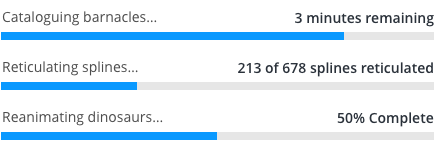 Task names on the left and time remaining or progress on the right
Progress bars work best when the duration of the task is between 3 seconds and roughly 15 minutes.
If the duration of the task is less than 3s then the progress bar will fill so fast it's almost redundant.
If the duration is longer than about 15 minutes then the progress becomes slow enough that it's almost imperceptible, which means it fails to reassure the user that progress is being made. 15 minutes is 900 seconds, so at 1px per second a progress bar would be 900px wide.
- HTML & CSS (in Storybook) which uses the design-system-scss repository (in Github), specifically _progress.scss
If the underlying process is not able to provide feedback about progress then best the UI can do is indicate that a long running process is running.
If this is expected to be a few seconds, rather than minutes or longer an indeterminate progress bar could be used.
 An indeterminate progress bar
The progress bar is available in two sizes, regular and small. Typically you would use the regular progress bar, but the small if you need a progress bar in small container, such as a in a table, or popup where the width is also restricted.
If none of the above is working for you, here are some other options.
- For less than 3 seconds: consider a Spinner or Progress Pie.
- For more than about 30 seconds showing a progress bar, but allowing users to navigate away if they wish and be notified when the task completes might be better.
- For more than 15 minutes it might be better to show when the task is expected to complete in real time (i.e. clock time). Even if the ETA (estimated time of arrival) is very rough it's better to let users do something else while they wait, and notify them one it completes.
- For processes where the duration can't be predicted, but is likely to be longer than a minute, provide a status display and notification, instead of showing a progress bar.
- When loading content a Skeleton outline of the shape of the content might be appropriate, if the delay is short. If it's long you will need some reassurance that progress is being made to avoid abandonment.
Implementations should take care that users with visual impairments can still be informed of updates to progress. They should be actively tested using screen readers.
See the following resources:
- Progress Element at Mozilla Developer Network
- ProgressBar ARIA role at Mozilla Developer Network
- WCAG documentation for Notification of Loading/Busy
Implementations should take care that users with visual impairments can still be informed of updates to progress. They should be actively tested using screen readers.
See the following resources:
- Progress Element at Mozilla Developer Network
- ProgressBar ARIA role at Mozilla Developer Network
- WCAG documentation for Notification of Loading/Busy;
Built in Accessibility features of semantic elements