A toggle control for selecting on/off
Checkboxes are essential UI components that allow users to select multiple options from a list. They operate independently, meaning selecting one does not affect others.
Enable Multiple Selections: Allow users to select zero, one, or multiple items.
AI Integration: Introduce AI explainability with a stable AI label.
Accessibility: Ensure accessibility with tested screen reader and keyboard navigation support.
Flexible Placement: Use in forms, modals, side panels, and data tables for batch actions.
Parent-Child Relationships: Implement parent checkboxes for bulk selection with indeterminate states.
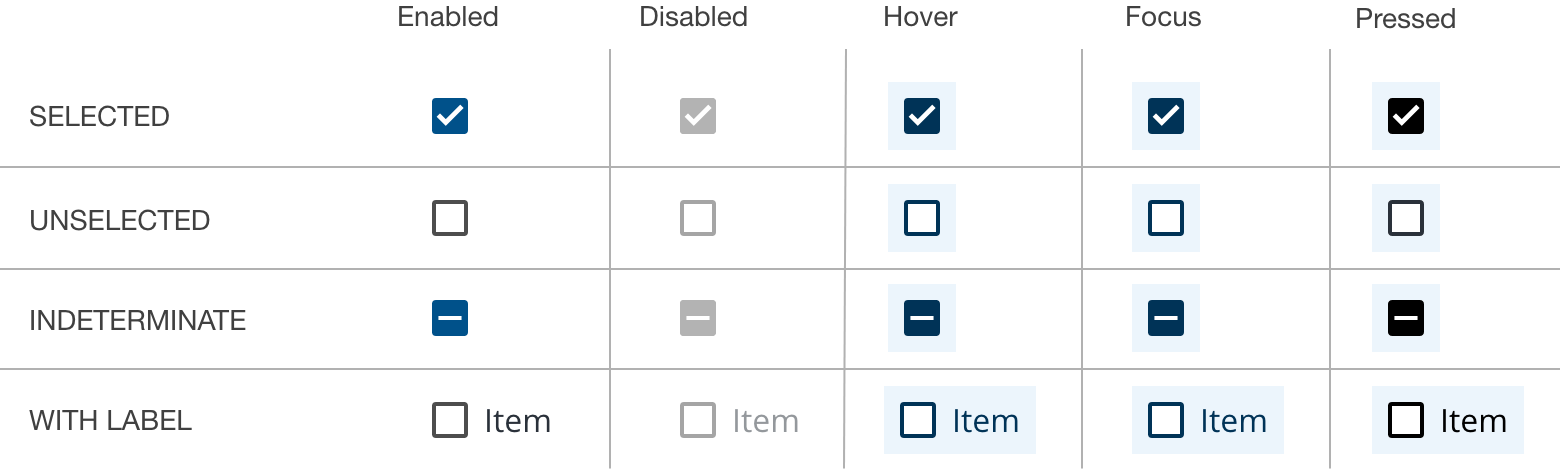
State Management: Support unselected, selected, indeterminate, focus, disabled, read-only, error, and warning states.
Forms: Suitable for full-page forms, modals, or side panels.
Filtering and Batch Actions: Ideal for filtering data or batch editing in data tables.
Terms and Conditions: Toggle agreement to terms with checkbox inputs.
Lists with Sub-selections: Manage parent-child relationships with bulk selection capabilities.
- Single Selection: Use radio buttons instead of checkboxes for mutually exclusive choices.
Anatomy: Comprises a checkbox label and input, with optional group labels.
Alignment: Position labels to the right; prefer vertical stacking for readability.
Placement: Maintain appropriate spacing in forms, adhering to style guidelines.
Group Labels: Provide context or action instructions; use sentence case.
Checkbox Labels: Ensure clarity and conciseness; avoid truncation.
Overflow Content: Allow text wrapping beneath the checkbox for alignment.
Behaviors
States: Manage various states including indeterminate for partial selections.
Group States: Apply read-only, disabled, error, and warning states with helper text.
Nesting: Support nested checkboxes for hierarchical selections.
Interactions
Mouse: Enable interaction through checkbox input or label clicks.
Keyboard: Navigate using Tab/Shift-Tab; trigger state changes with Space.
Radio Buttons: Use for mutually exclusive choices.
Toggle Switches: Prefer for immediate actions without confirmation.
Data Tables: Refer to data table guidelines for checkbox usage within tables.
For further details, refer to the full demo on Storybook and consult the Carbon content guidelines for additional content guidance.